Study Information FAQs

1. Study Procedures
-
How do I know if I am enrolled in the study? ➤
- You will know you are enrolled if you receive a message from our chatbot the morning after you sign up, and you receive a text to complete a daily survey at 5pm. If you do not receive these messages the day AFTER you sign up, please email the study team at smartrstudy@nih.gov.
-
What do I need to do for this study? ➤
- Please go to the Home Tab and view our Welcome Page for study information. If you still have questions, email us at smartrstudy@nih.gov.
-
How do I get paid for the study? ➤
- You will receive a payment via Paypal or Amazon Gift Code. The payment will come via email from Capital Consulting Corporation. It may take up to 5 business days to receive this email. Please check your “promotions tab” if your email has such a feature, to ensure you can find the email.
- You will be paid for the following study activities:
- $20 for enrollment procedures.
- If you’re in the study with the AWARE app, this includes downloading/registering the TTRU-AWARE app + completing the baseline survey.
- We will send this first payment to you within 5 business days of completing the survey.
- $20 for enrollment procedures.
- You will be paid weekly for the following activities:
- $1 for each day you complete the daily online survey (the daily online survey should take about 5 minutes to complete.
- If you are in the AWARE app study, you also earn $1 for each day you keep the TTRU-AWARE app active on your phone.
- $3 for each day you meaningfully answer at least one question from the chatbot must say more than 'yes' 'no' or 'okay', etc.
- $10 for completing a follow-up survey every 30-days. We will keep the 30-day follow-up survey open for 5 days.
- This will be added to your next weekly payment.
- $15 for sharing ChatGPT chat history files (if this applies to your study).
- This will be added to your baseline payment or your next weekly payment.
- $1 for each day you complete the daily online survey (the daily online survey should take about 5 minutes to complete.
-
How often will I get paid? ➤
- For Baseline and Enrollment:
- After completing the baseline survey and registering the TTRU-AWARE app (if you are in the app study), we will process your $20 once we verify your eligibility. It may take up to 5 business days for you to receive the email from Capital Consulting Corporation with your payment.
- For Daily Surveys, Chatbot Interactions, Follow-up Surveys, and other tasks:
- We will process payments weekly (on Mondays I will process the payments, unless there is a federal holiday).
- We will calculate how many days during the following week that you completed a daily tasks.
- We may not be able to make any payments less than $5 (we definitely cannot if you are being paid with Amazon gift codes), so if you earned less than $5 (for example, you joined the study on a Friday), then your earnings will be added to the next payment.
- It may take up to 5 business days to receive the weekly payment! Sometimes the payment comes quickly (Monday or Tuesday) but it can take longer!
- For Baseline and Enrollment:
-
When do I need to take surveys? ➤
- The survey will be open daily from 5pm-2am local time.
- You will receive a message to take the survey at 5pm with a link to the survey.
- Make sure cellular data or wifi connection is on.
- If you have not yet completed the survey, we will send you a reminder between 9-10pm.
- The survey will close at 2am and you will no longer be able to complete the survey for that day.
- You need to take an online survey each day to get paid and stay in the study.
- The survey will be open daily from 5pm-2am local time.
-
What happens if I miss a survey or chatbot response? ➤
- You will not be paid for the survey or chatbot response you missed.
- You will be notified that you missed the survey.
- If you have any questions or concerns please contact the study team: smartrstudy@nih.gov
-
Who can I contact for technical support? ➤
- Email us at smartrstudy@nih.gov
-
I am no longer interested in participating in the study. What should I do? ➤
- Reach out to the study team at smartrstudy@nih.gov if you have any questions or want to discuss your participation with us.
- In the TTRU-AWARE app, please select “Quit Study.”
2. TTRU-AWARE App Questions
-
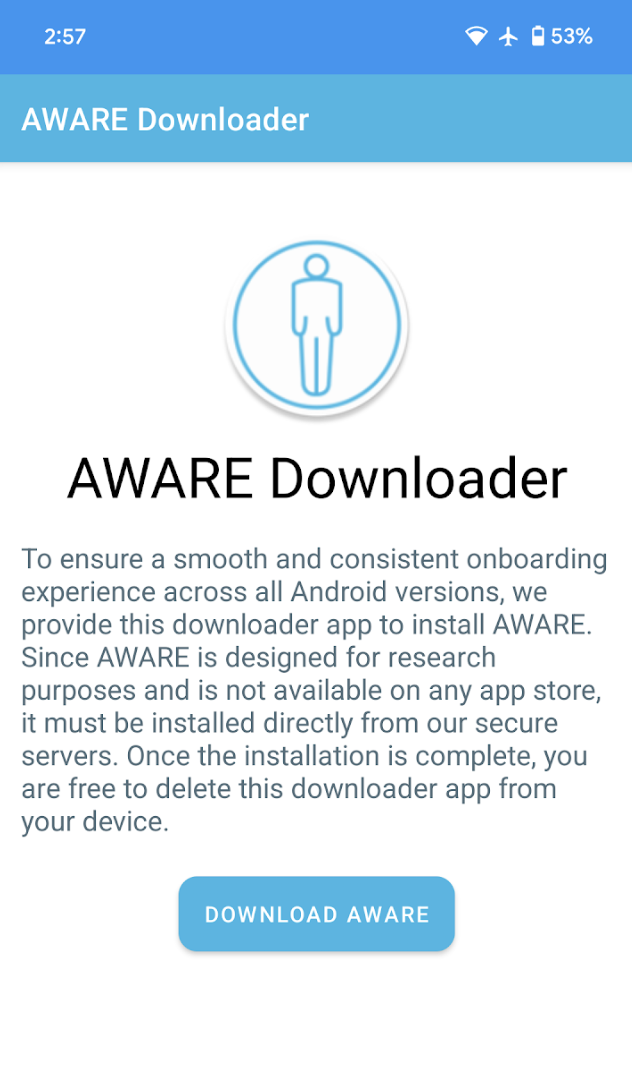
I can’t see the button to Download AWARE. What should I do? ➤
- Usually this happens when the text on your phone is enlarged (or zoomed to more than 100%). Currently, our app does not "scroll" so if you do not see the button to download, you may need to resize the text on your phone to 100% or smaller in order to see the button.
- It should look something like this:
-
What steps should I take if the app stops running? ➤
- If you suspect the app has stopped, try reopening it from your app drawer. Make sure that background processes haven’t been restricted by battery-saver or task-killer settings.
- If problems persist, restarting your device or contacting technical support is advised: smartrstudy@nih.gov
- If you suspect the app has stopped, try reopening it from your app drawer. Make sure that background processes haven’t been restricted by battery-saver or task-killer settings.
-
Can I disable notifications without affecting the study? ➤
- We don’t recommend disabling notifications because you get paid for keeping the app active on your phone and allowing the necessary permissions.
-
I received a message that my TTRU-AWARE app is not sending data. What should I do? ➤
- You can confirm the app’s activity by checking for a persistent notification in your status bar or by opening the app to view the live status screen. Our user guide also includes instructions on verifying the app’s background activity.
- Make sure your app is downloaded:
- Make sure you can see the AWARE app icon on the home screen or your app-drawer
- Go to Settings → Apps → AWARE → Make sure all permissions are enabled
- Go to Settings → Accessibility → AWARE → Make sure the “control” is turned on.
- Ensure you have connectivity:
- Ensure your cellular network or WiFi is connected
- Ensure your phone is not on Airplane Mode.
- Check your app is working.
- Open AWARE - if your app does not open or respond - please reach out to the study team ASAP.
-
What happens if I accidentally force-stop the app? ➤
- If the app is force-stopped, you may temporarily stop data collection. You can simply reopen the app to resume participation. If this happens frequently, please review your device’s settings or contact support.
-
How can I limit the app’s data usage? ➤
- Our app is optimized to minimize data consumption. If you notice high data usage, using Wi-Fi instead of mobile data will help reduce consumption. In the app settings, you can often enable a data-saving mode. If you continue to experience high usage, contact our support team so we can investigate further.
- Our app is programmed to store data on the app and will send to us once an internet connection is established, so if data usage is a concern - make the app sync on “WiFi only.”
-
What happens if I lose network connectivity? ➤
- If connectivity is lost, the app is designed to store data locally and automatically sync once you’re back online. This ensures that no information is lost during temporary disconnections.
-
Is the app slowing down my phone? ➤
- Our app is designed to be lightweight and run in the background without impacting overall performance. If you experience slowdowns, check if other apps or system updates are affecting performance and feel free to reach out to support for further troubleshooting: smartrstudy@nih.gov
-
How will the app affect my battery life? ➤
- The app is engineered to run efficiently in the background, but continuous activity may slightly increase battery use. If you notice a significant drain, try closing other apps. Let us know if the issue persists: smartrstudy@nih.gov
-
How can I update the app? ➤
- Press and hold the AWARE app icon, click on the uninstall option and confirm.
- If AWARE Downloader app is currently installed, please uninstall this app as well.
- Click on the link in the "AWARE UPDATE" SMS.
- Follow the initial setup guide at link to complete the installation process.
-
Who can I contact for technical support? ➤
- Email us at smartrstudy@nih.gov
3. Chatbot Questions
-
How many questions do I need to answer? ➤
- You need to interact with the chatbot at least once per day by answering one of the questions in a meaningful way (more than just 'yes' or 'ok' etc.).
- You do not need to answer every single question, but you can if you want to.
- We wanted to provide enough questions to help remind you to engage with the chatbot, but we don't want you to feel like you must respond to every question. Just answer at least 1 question per day.
- The chatbot will always send a response, so if you want to end the conversation, you can simply not respond, or say 'bye'. Then the chatbot will text you during the next timeframe (morning, afternoon, or evening).
- NOTE: Don't respond STOP unless you would like to unenroll from the study. When you respond STOP, you will automatically be unenrolled from the chatbot. If you say STOP by accident, you can say START to be able to receive texts again. Why? It is the law that an automated text platform must stop sending text messages when a person responds STOP.
-
What should I talk about? ➤
- Please answer at least 1 question the chatbot asks you. The rest of your conversation is up to you. You can chat with the chatbot about whatever you want.
- Please be aware, though, that you should not text the chatbot anything you would not feel comfortable sending via text message to anyone. Why? Because we cannot guarantee privacy on your phone, particularly if it was lost or stolen. Please also keep a passcode and/or a biometric login security activated.
-
Can I initiate/start a conversation with the chatbot? ➤
- Yes, you can text the chatbot 24/7 and it will respond. If you would like to chat, just text the chatbot.
-
What if the Chatbot is giving me weird responses? ➤
- If you receive any responses that seem unusual, or seems like it was programmed (for example, [Monday August 31] or something) you can ignore this or email the study team to let them know at smartrstudy@nih.gov.
- If the chatbot is conversing with you during the slot where you are meant to receive your next question, the chatbot may send a response to your conversation AND the next scheduled text (for example, if you are chatting at 1pm and you are supposed to get your afternoon text at 1pm, you will likely receive both a response AND the next question). You can choose to continue your conversation or respond to the scheduled question.
- If you notice anything else out of the ordinary and want to let the study team know, please send us an email at smartrstudy@nih.gov.
-
Is someone reading the chat? ➤
- The chatbot is not being monitored by the study team in real time. The chatbot is a research procedure being used as a way to collect information from you that we will analyze in future research studies.
